PDF Generation Template Editor
Open-source visual PDF generation engine with customizable templates and developer-friendly APIs.
When an annotation, text, form, or content editor object is selected, a context menu pops up to support object operations. ContextMenuConfig controls the menu style and the menu item list for each scenario.
{
  "contextMenuConfig": {
    "backgroundColor": "",
    "fontSize": 14,
    "padding": [0, 0, 0, 0],
    "iconSize": 36
  }
}| Field | Description |
|---|---|
backgroundColor | Menu background color (empty string uses default) |
fontSize | Menu text size |
padding | Menu padding [left, top, right, bottom] |
iconSize | Icon size |
The global configuration applies to global context menus across all modes:
{
  "contextMenuConfig": {
    "global": {
      "screenshot": [
        { "key": "exit" },
        { "key": "share" }
      ]
    }
  }
}viewMode configures menus in viewer mode:
{
  "contextMenuConfig": {
    "viewMode": {
      "textSelect": [
        { "key": "copy" }
      ]
    }
  }
}annotationMode contains the following sub-menu scenarios:
"textSelect": [
  { "key": "copy" },
  { "key": "highlight" },
  { "key": "underline" },
  { "key": "strikeout" },
  { "key": "squiggly" }
]"longPressContent": [
{ "key": "paste" },
{ "key": "note" },
{ "key": "textBox" },
{ "key": "stamp" },
{ "key": "image" }
]"markupContent": [
{ "key": "properties" },
{ "key": "note" },
{ "key": "reply" },
{ "key": "viewReply" },
{ "key": "delete" }
]| Scenario | Config Key | Supported Menu Items |
|---|---|---|
| Ink | inkContent | properties, note, reply, viewReply, delete |
| Shape | shapeContent | properties, note, reply, viewReply, delete |
| FreeText | freeTextContent | properties, edit, reply, viewReply, delete |
| Sound | soundContent | reply, viewReply, play, record, delete |
| Stamp | stampContent | note, reply, viewReply, delete, rotate |
| Signature Stamp | signStampContent | signHere, delete, rotate |
| Link | linkContent | edit, delete |
contentEditorMode contains the following scenarios:
"editTextAreaContent": [
  { "key": "properties" },
  { "key": "edit" },
  { "key": "cut" },
  { "key": "copy" },
  { "key": "delete" }
]"editSelectTextContent": [
{ "key": "properties" },
{ "key": "opacity", "subItems": ["25%", "50%", "75%", "100%"] },
{ "key": "cut" },
{ "key": "copy" },
{ "key": "delete" }
]"editTextContent": [
{ "key": "select" },
{ "key": "selectAll" },
{ "key": "paste" }
]"imageAreaContent": [
{ "key": "properties" },
{ "key": "rotateLeft" },
{ "key": "rotateRight" },
{ "key": "replace" },
{ "key": "export" },
{ "key": "opacity", "subItems": ["25%", "50%", "75%", "100%"] },
{ "key": "flipHorizontal" },
{ "key": "flipVertical" },
{ "key": "crop" },
{ "key": "delete" },
{ "key": "copy" },
{ "key": "cut" }
]"editPathContent": [
{ "key": "delete" }
]"longPressWithEditTextMode": [
{ "key": "addText" },
{ "key": "paste" },
{ "key": "keepSourceFormatingPaste" }
]"longPressWithEditImageMode": [
{ "key": "addImages" },
{ "key": "paste" }
]"searchReplace": [
{ "key": "replace" }
]formMode configures menus for each form type:
{
  "contextMenuConfig": {
    "formMode": {
      "textField":      [{ "key": "properties" }, { "key": "delete" }],
      "checkBox":       [{ "key": "properties" }, { "key": "delete" }],
      "radioButton":    [{ "key": "properties" }, { "key": "delete" }],
      "listBox":        [{ "key": "options" }, { "key": "properties" }, { "key": "delete" }],
      "comboBox":       [{ "key": "options" }, { "key": "properties" }, { "key": "delete" }],
      "signatureField": [{ "key": "startToSign" }, { "key": "delete" }],
      "pushButton":     [{ "key": "options" }, { "key": "properties" }, { "key": "delete" }]
    }
  }
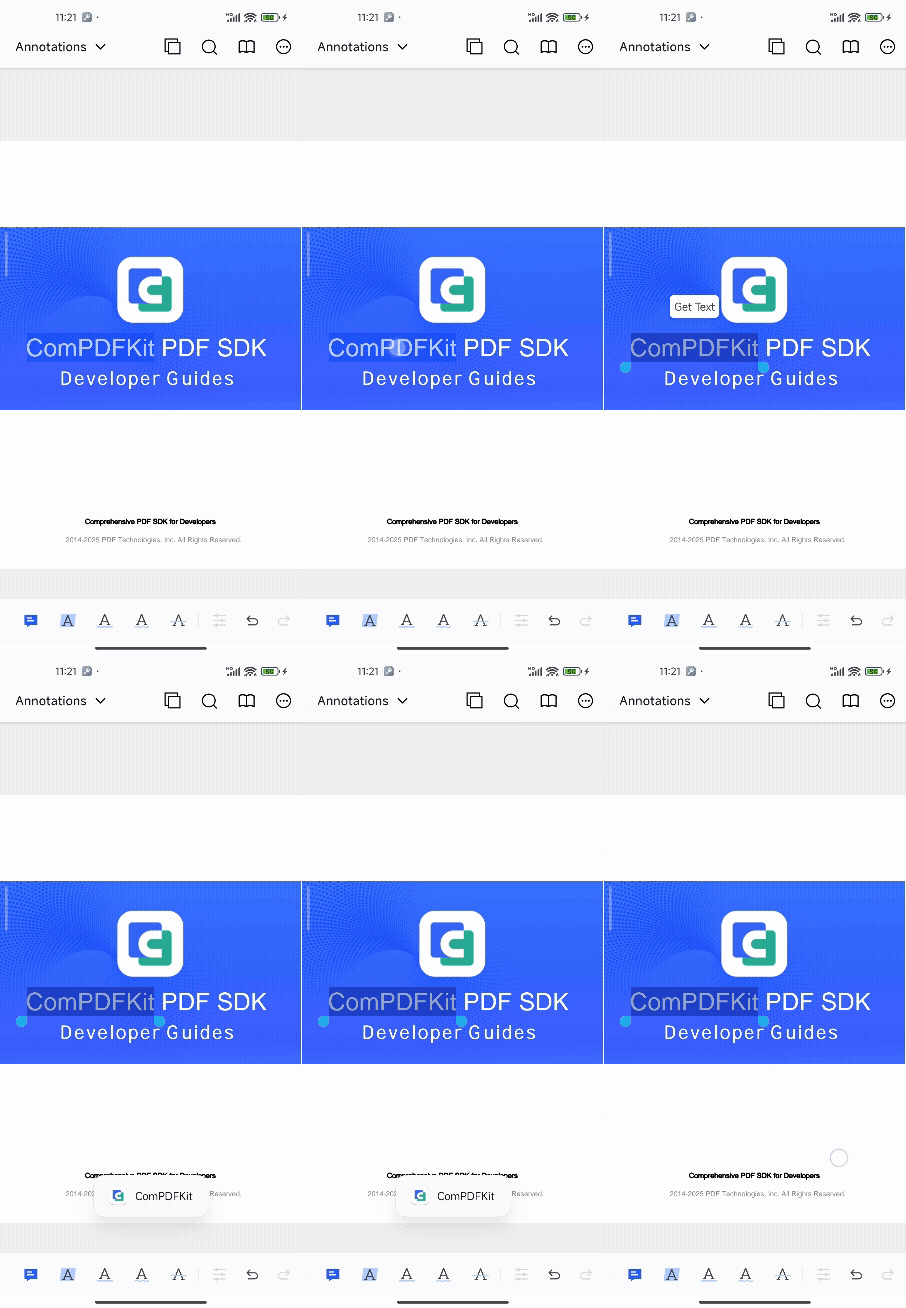
}Add custom buttons to any menu scenario:
{
  "contextMenuConfig": {
    "annotationMode": {
      "markupContent": [
        { "key": "properties" },
        { "key": "note" },
        {
          "key": "custom",
          "identifier": "custom_markup_action_get_text",
          "title": "Get Text",
          "icon": "ic_test_get_text",
          "showType": "text"
        },
        { "key": "delete" }
      ]
    }
  }
}| Field | Description |
|---|---|
key | Must be "custom" for custom buttons |
identifier | Unique identifier to distinguish different buttons in callbacks |
title | Display text |
icon | Icon resource name (must be in res/drawable) |
showType | Display type: "text" or "icon" |
CPDFCustomEventCallbackHelper.getInstance().addCustomEventCallback(extraMap -> {
    String customEventType = extraMap.get(
        CPDFCustomEventField.CUSTOM_EVENT_TYPE).toString();
    if (CPDFCustomEventType.CONTEXT_MENU_ITEM_TAPPED.equals(customEventType)) {
        String identifier = extraMap.get(CPDFCustomEventField.IDENTIFIER).toString();
        switch (identifier) {
            case "custom_markup_action_get_text":
                CPDFAnnotation annotation = (CPDFAnnotation) extraMap.get(
                    CPDFCustomEventField.ANNOTATION);
                if (annotation instanceof CPDFMarkupAnnotation) {
                    String text = ((CPDFMarkupAnnotation) annotation).getMarkedText();
                    CToastUtil.showToast(getApplicationContext(), text);
                }
                break;
        }
    }
});CPDFCustomEventCallbackHelper.getInstance().addCustomEventCallback { extraMap ->
val customEventType = extraMap[CPDFCustomEventField.CUSTOM_EVENT_TYPE].toString()
if (CPDFCustomEventType.CONTEXT_MENU_ITEM_TAPPED == customEventType) {
val identifier = extraMap[CPDFCustomEventField.IDENTIFIER].toString()
when (identifier) {
"custom_markup_action_get_text" -> {
val annotation = extraMap[CPDFCustomEventField.ANNOTATION]
if (annotation is CPDFMarkupAnnotation) {
CToastUtil.showToast(applicationContext, annotation.markedText)
}
}
}
}
}